Defining a retry policy in SAP Event Mesh
Retry policies in an event-driven setup can fail in two directions. Both are expensive, each in their own way. Mess up a parameter, and a single message that always fails keeps coming back. Thousands of executions per second hit your Cloud Integration tenant, and since SAP bills by processed message, you burn through your contracted volume in minutes. The failure is loud, but at least you notice it.
Implement a bad exception management and you get the worse outcome: transient errors get acknowledged as if they had succeeded, the message is gone, and nothing lands in a dead letter queue. There is no alert and no record of anything ever failing. You find out weeks later when somebody asks why a document never made it downstream.
In the end, both failure modes come from the same place: the parameters that govern retries are spread across two components, they interact multiplicatively rather than additively, and one of them behaves in a very quirky way (i.e. zero is treated as infinite retries, for some reason). Here is how to define a retry policy that does what you intend. (If you want, you go straight for the recipe).
The parameters that compete
Two fields decide how many times a message gets processed, and they live in two different places.
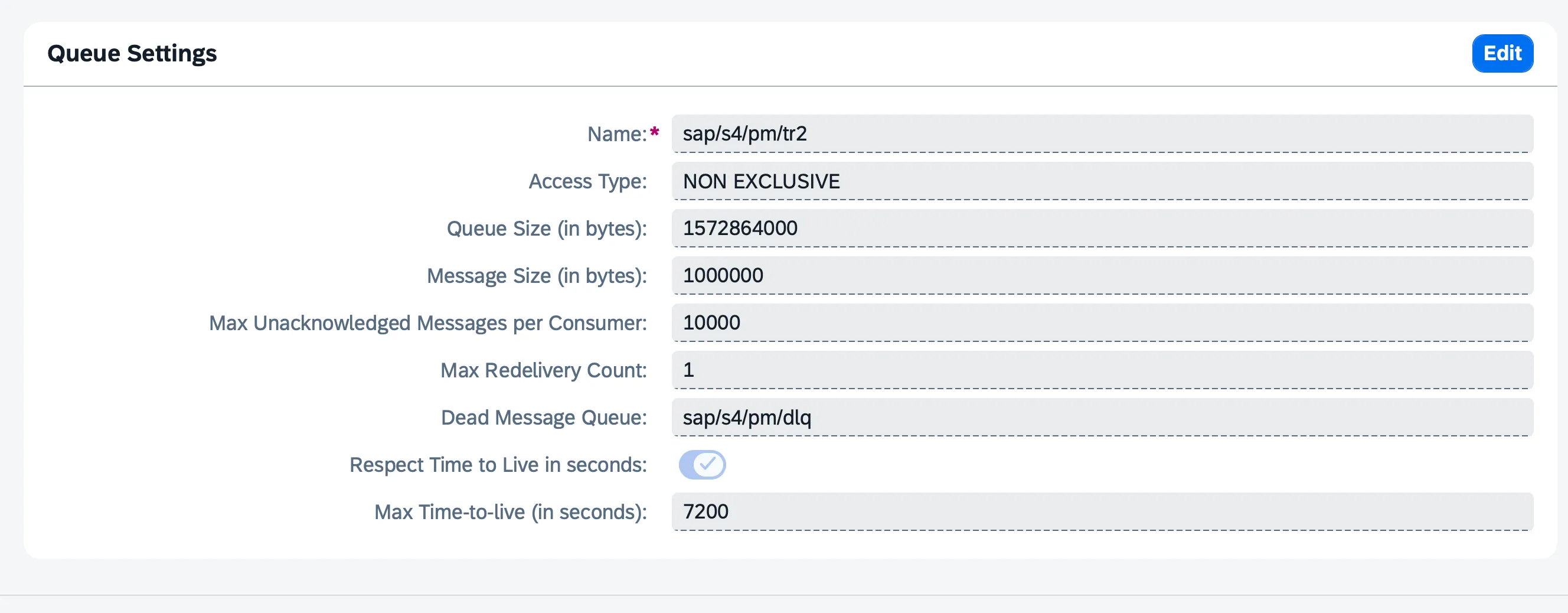
On the queue, in Event Mesh, there is Max Redelivery Count:
On the AMQP sender in Cloud Integration, under the Processing tab, there’s Max. Number of Retries. There are two more parameters, Max. Number of Prefetched Messages and Number of Concurrent Processes, that control how messages are fetched and processed.
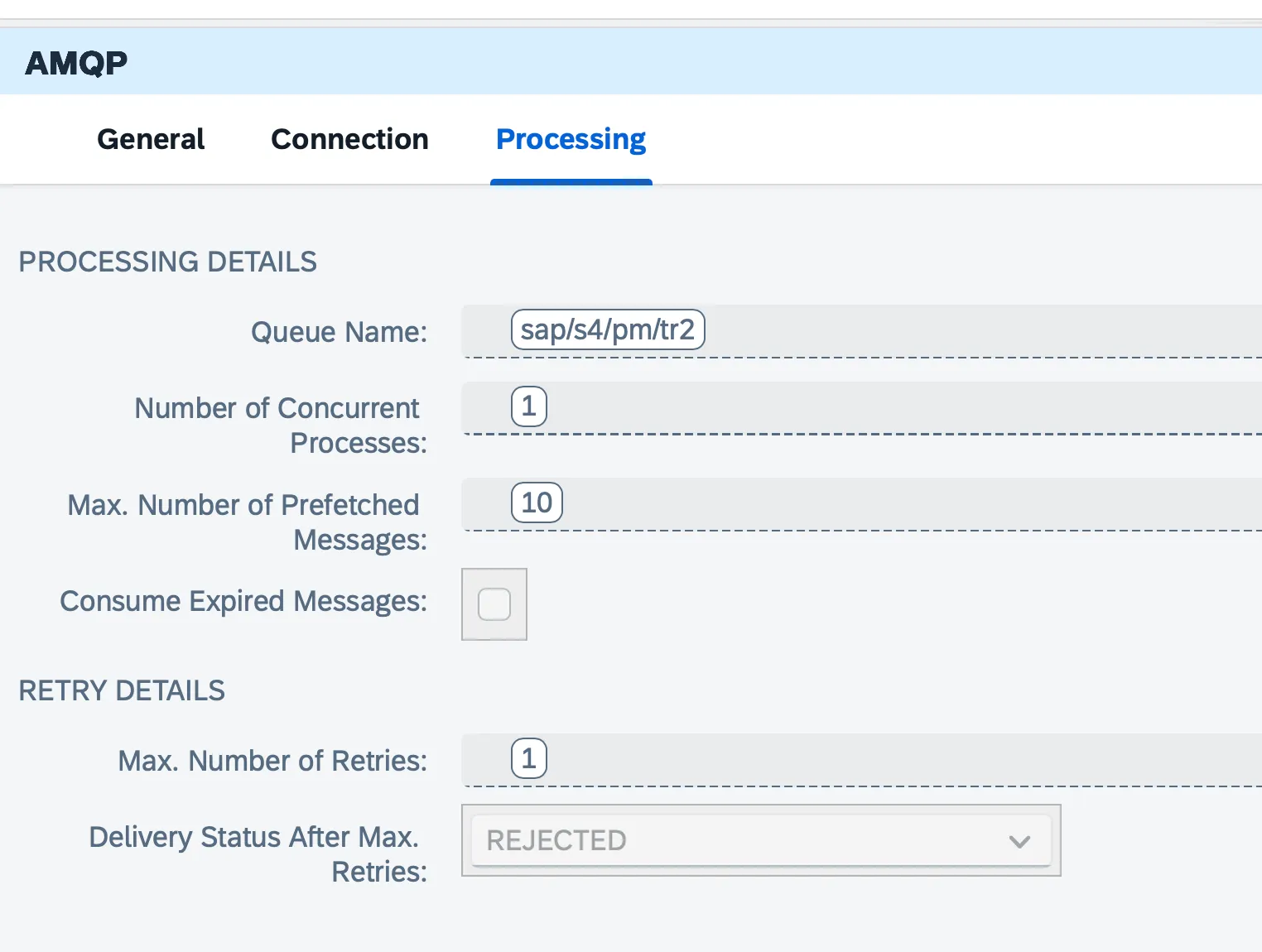
Both Max Redelivery Count (queue) and Max. Number of Retries (AMQP sender) control the maximum amount of times a message can be reprocessed. The other two shape how messages arrive. This is what they do:
-
The AMQP adapter fetches a message and tries to process it. The processing fails, and it’s time to try again. The parameter Max. Number of Retries decides how many times this will happen before the broker knows something went wrong. These executions are fast, only seconds or milliseconds apart, and they all happen inside the adapter. Call this the inner loop.
-
At some point (after the initial execution + the configured number of retries), the AMQP adapter tells the broker (SAP Event Mesh) that the message could not be processed. The broker, using the queue Max Redelivery Count number, launches as many redeliveries as you have configured. Each redelivery is a fresh read from the queue, persisted broker-side, and it survives restarts. This is the outer loop. The amount of attempts in each further redelivery is equal to the value configured on the AMQP adapter.
The sequence is always the same. There is one initial execution. If it fails, the adapter runs its configured retries in memory. If those fail too, the message goes back to the queue, which redelivers it as many times as the Max Redelivery Count allows, and each of those redeliveries runs the adapter’s entire retry loop again from scratch.
The detail that changes the arithmetic: the initial execution happens once for the whole process, not once per redelivery.
The maximum number of times the same message will go through your Cloud Integration environment is given by:
That is an upper bound: as soon as one attempt succeeds, everything stops.
These are my test results, confirming this:
| (queue) | (adapter) | Observed total | Breakdown |
|---|---|---|---|
| 1 | 1 | 3 | |
| 2 | 2 | 7 | |
| 1 | 4 | 9 |
In practice you work backwards: you know roughly how many attempts a message deserves, and you need the values that get you there.
Leave the adapter’s retries at 1 and the formula collapses to . That is the combination worth defaulting to, and the tidy arithmetic is the least of the reasons. Inner retries live in memory, so a worker restart or a redeploy wipes them, while redeliveries are persisted broker-side. Inner retries also stay on the same node, whereas each redelivery is a fresh read that another node can pick up. And exhausting the redeliveries is what moves a message to the DLQ, which burning through adapter retries alone never does. For a given total, spending your attempts on redeliveries beats spending them on retries in every respect.
Do not expect any of this to survive an outage
One expectation to set before you tune these numbers: neither loop backs off. The adapter’s retries fire seconds apart, and redeliveries are immediate as well, which is exactly why a Max Redelivery Count of 0 produces thousands of executions per second rather than a slow trickle. There is no configurable delay or backoff interval anywhere in this mechanism.
Retries here rescue races and blips. They do not rescue outages. A target system that is down for thirty seconds will burn through every attempt you configured in a fraction of that time and land the message in the DLQ regardless of how generous your numbers looked. Surviving a real outage needs the DLQ plus a separate reprocessing path, and the first post in the references covers the tactics for building one. It is an excellent post, so read it if you find the time.
The delivery status can switch the outer loop off
One field qualifies all of the above. Delivery Status After Max. Retries, on the same Processing tab, tells the adapter what to do once it has exhausted its inner retries.
Set it to REJECTED. That is the value Event Mesh expects: the message is rejected, goes back to the queue, gets redelivered according to the Max Redelivery Count, and lands in the DLQ once that is exhausted.
MODIFIED_FAILED_UNDELIVERABLE is, as far as I’ve been able to test, not supported by Event Mesh. It tells the broker not to hand it over again, and that cancels the outer loop entirely.
A rule of thumb to manage concurrency and prefetching
Neither of these multiplies the retry count, which is a common enough assumption.
Max. Number of Prefetched Messages controls how many messages the broker hands over at once through the connection. Number of Concurrent Processes controls how many are worked on simultaneously. With concurrency at 1, prefetched messages sit and wait their turn; they are not processed in parallel, and prefetch does nothing for throughput.
The criteria are straightforward: for long flows (over a minute), set prefetch to 1. For flows in the millisecond range, 10 or more is fine. You do not want your information to go stale.
One interaction between the two is easy to miss. The redelivery lock starts counting once the first message in the prefetched batch begins processing, and that one clock covers the whole batch. Pair a large batch with slow processing and the messages still waiting their turn can have their lock expire before they are ever touched, which produces duplicate deliveries. Large prefetch plus slow flows is the combination to avoid.
Never leave the redelivery count at zero!
In Event Mesh, Max Redelivery Count = 0 does not mean “no retries”, as one might very reasonably expect. It means unlimited. Same applies for an empty parameter. This is really, really important as it can mean someone will need to empty their wallet at the end of the month if you leave things unattended.
The queue never stops attempting delivery. Feed it a message that always fails and you get an uninterrupted flood of executions into Cloud Integration that continues until somebody notices and disables something by hand. This is exactly the expensive failure mode from the top of this post, and it is a one-character mistake.
The behaviour is documented in SAP Note 3469268 and I have confirmed it in testing. Always set a finite value of 1 or more. The same applies to leaving the adapter’s Retries field empty.
What actually counts as a failed execution
All of the arithmetic above is irrelevant if the iflow never signals a failure, and this is where retry policies stop working without anybody noticing.
What determines whether a message is retried is whether the adapter acknowledges it (ACK) or leaves it unacknowledged (NACK), and that is decided by how the exception subprocess ends:
| End event | Signal to the queue | Retried? |
|---|---|---|
| Message End | ACK, treated as a happy path | No |
| Escalation End Event | ACK, treated as a handled error | No |
| Error End Event | NACK, the error is rethrown | Yes |
A Message End and an Escalation End both tell the queue the message was dealt with. The queue takes that at face value and moves on, regardless of whether an error occurred and regardless of how generous your Max Redelivery Count is. Only an Error End Event produces a NACK, and only a NACK triggers either loop.
That gives you three deliberate choices:
- Message End for the happy path, when the message was processed as intended.
- Escalation End Event for controlled outcomes: messages that fail a validation, records you mean to discard, business errors you have consciously decided to swallow. The message is consumed on purpose, and the Escalation gives you a hook for alerting or logging on the way out.
- Error End Event for anything that deserves another attempt: an endpoint that does not answer, a 5XX from the target system, a connection reset, a timeout.
The mistake to watch for is routing infrastructure errors into an Escalation because it makes the monitoring look clean. It does, and it also means those messages are gone.
The recipe
To have a message reprocessed times and then land in the DLQ:
- Set Delivery Status After Max. Retries to
REJECTED, so the outer loop runs and the message ends up in the DLQ instead of disappearing. - Route your error handling correctly: Error End Event for retryable failures, Escalation End Event for controlled discards, Message End for the happy path. Get this wrong and nothing in the following steps matters, because the queue will never be told there was a problem.
- Leave Max. Number of Retries at 1 and set your total with the redeliveries, since . Every whole number from three upwards is reachable that way, and the attempts you are paying for are the persistent ones that can end in the DLQ.
- Keep prefetch low on slow flows, so redelivery locks do not expire inside a waiting batch.
- When testing, always set the Number of Concurrent Processes to one. This means that, even if you make a mistake, messages will be processed at roughly the rate of one every 3 seconds. This is manageable and you can purge the queue, undeploy your iflow, or knock on Amazon’s door in Frankfurt to ask if they can please shut up the node you’re running on.
For the error handling in step 2, the SAP Community post listed below goes further than I do here and covers concrete tactics for structuring exception subprocesses around this behaviour. Read it in full before you commit to a design.
References
- Event Mesh + AMQP: The Retry Trap Nobody Warns You About, on SAP Community. Excellent read with practical error-handling tactics.
- AMQP Sender for SAP Event Mesh, on the SAP Help Portal.
- Cloud Integration: Connecting to Messaging Systems using the AMQP Adapter.
- KBA 3217720, on messages staying in Retry instead of moving to Rejected.
- SAP Note 3469268, on the infinite delivery cycle when redeliveries are set to 0.