A not-so-technical guide to cryptographic objects: certificates, keys & PKCS12 explained.
Introduction
You sit at your desk, about to solve the umpteenth auth problem of the week. Someone is receiving an HTTP 403 error, or is having a problem with the SSL handshake, or is getting something about a certain “PKIX” being wrong. Some colleague mentions that the solution requires a certificate renewal. It’s an SSL certificate. Here you have it. But wait: it says in some support note that you actually need the whole trust chain. While you scramble to download it, meanwhile, the client got confused and sent over a client certificate they thought might be relevant. But wait again! It’s not a certificate, but a key pair, protected by a password they did not send over. As you attempt to explain that this was unnecessary, the certificate you downloaded somehow is not the same thing that you need to upload to the system, which requires an X.509 DER certificate, but you have a .crt file. Anxious and confused, you turn to your trusted LLM assistant, which throws some openssl commands at you. Even more anxious, you decide to try to learn a couple new words to throw in a mail to give the illusion of control, but Wikipedia sudently starts rendering LaTeX equations that have mod n everywhere, whatever that is. You finally ask a senior colleague for help.
Sounds familiar? I don’t think I am alone in saying that, for some time, all of these cryptography-related terms made me more confused than I was willing to admit to myself. This was no fault of mine: coming from a non-compsci background, I had never been explained what an X.509 certificate is, what ASN.1 is or why we present cryptographic objects using PEM, an acronym where the M stands for “mail” for some reason. The list does not end there: countless acronyms fill every support note, every menu; PKCS#12, CSR, X.509, DER, PGP, RSA, SHA…
After some field work and note-taking, I finally feel comfortable. This document is the one thing I would have liked to have when I first started. Think of it as a friendly guide through the concepts that come up more often in the life of a technical consultant. I think the lines that follow will be very useful to those that wish to have a clear mental image of how all of these terms fit together. An additional series in this blog (which I intend to publish during the summer) will get into deeper detail, but I think this is good enough as a first contact. So let’s begin.

First contact: be not afraid
The idea of learning cryptography sounds intimidating because there seem to be maths involved, but we won’t need them at all. The part we need to understand is completely math-free and the problems being solved are very easy to understand. This section explores those problems and introduces some concepts that will come up later.
Cryptostuff: the objects and the system
Before talking about concrete stuff, we should clarify that there are two levels on which we can try to understand things. In our work as integration consultants, we deal with cryptographic objects: certificates, key pairs, public and private keys, signature requests, and such. These objects have fixed structures and properties that we will understand. On the other side, these objects are not always created using the same methods: the mathematical theory that allows you to create an object (also known as cryptosystem) can change. To us, as consultants, cryptosystems are not as important as the objects themselves. We are interested in understanding what a certificate is, or what is the difference between a public key and a certificate, whereas the importance of truly random 1024-bit prime numbers is of little use to us. We will focus on the objects, and not as much on the way they are made.
Why these things are important
Cryptography solves a very common problem: how do you have a private conversation in a room full of people? In our context, the room is the Internet, and the conversation is sending messages back and forth between two computers. There are very interesting problems that immediately come to mind. For example: suppose you wanted to talk to somebody “in code”, saying words backwards. You need to tell this to your friend so that they can understand how you are going to talk from now on, to avoid eavesdroppers. But how do you tell them this, without the eavesdroppers also hearing it?
Another problem: someone rings your bell and says: “I am from the electric company and I am here to review your installation”. You let them into your house and they mention that they need to charge 100€ before doing anything. How do you, without error, verify that they are legit and not a scammer?
These problems came up very often for the people who were designing the first computer networks, half a century ago. You have a place (a network of computers) where potentially anyone can listen to anything, or claim to be anyone. And the procedures and ideas they developed are, in good measure, still behind the way the internet works (although some revisions have been made to keep things up to date).
Birdview: how this all works
Before getting into more concrete terms, let’s paint a picture: how does cryptography allow us to send information back and forth securely? The methods that allow this are usually called public-key cryptography. Here is how it works.
- You decide that you want the information being sent to someone else to be encrypted. That is, modified so that it makes no sense for someone catching it on the fly.
- To cipher some text, you need to apply a mathematical operation that the receiver can undo easily, but that an eavesdropper cannot.
- To do this, you agree on a method (instructions that allow you to mangle information) and some keys (specific numbers that allow you to mangle and un-mangle information).
For example, if the information was an ordered deck of cards, the method would be something like “divide the deck into groups of
Ncards and re-group them in inverse order”. The key would be the numberNthat allows you to reconstruct the original deck later. - You exchange keys with your receiver in a secure way, to avoid an eavesdropper knowing them (because then they would be able to reconstruct the original thing being said).
- Once you have it all ready, you start ciphering data, sending it, receiving responses and unciphering them. No one without the keys should be able to understand anything they catch.
- Done!
In real life, there are usually two keys. They are nothing more than numbers that satisfy some mathematical property, and which are enormous. (They are, for most cases, about 300 digits long).
One of those numbers is called the public key. As you can imagine, this is the one that you can send over to people you are talking to. You can share it because the things it can do are harmless: it can encrypt information, or it can verify some identity. On the other hand, there is also the private key. This one you do not allow anyone to see, because it can do powerful things: it can decipher information, and it can assert “I am such and such person”. You do not want anyone other than you to be able to do that.
In summary:
| Action | Public key | Private key |
|---|---|---|
| Ciphering | Can cipher | Can decipher |
| Signing | Can validate | Can sign |
| Authentication | Can validate | Can claim an identity |
This table alone will solve most of the problems in the day-to-day of an integration consultant. For example:
-
Is someone having an authentication problem? If they are the server (computer receiving the request and serving a response), then they will need to validate if the identity the sender claims is true. How do you validate an identity is true? Using a public key. Therefore, the server might need the corresponding public key updated. (Or, actually, the certificate: more on that later). If the person having problems is the client (the one sending requests to the server), then they need to claim that they are such person in the first place, and they need the private key. (Or actually, the key pair: this will be clarified later too).
-
Someone mentions they are using a method called PGP to receive encrypted documents, but they are having trouble deciphering them. Because they are deciphering, you understand that they need a private key.
It is normal to still feel lost at this point, because this all seems very general and real problems tend to be denser in technical names and acronyms. But don’t worry, we are getting there. A summary of the things we learned in this section:
- There are methods that allow us to tangle and untangle information. These methods are commonly known as cryptosystems.
- These methods generate keys, which are nothing more than very big numbers with some special mathematical properties. We will not concern ourselves with this for now.
- There are two types of keys in the context of the Internet: public keys (can be shared; are used to encrypt messages and verify identity), and private keys (for your eyes only; are used to decrypt messages and assert identity).
It is recommended to take a break here to try and absorb these ideas. The next chapter will be a little denser because specific names will be introduced, but they are nothing more than particular implementations of these ideas.
Getting a bit deeper
So now we understand the basics. How is this actually used in real life? This chapter will be maybe the densest in all of this document, because it will contain most of the names that come up daily. But they are not difficult ideas, especially at the level we need to operate with them.
Crypto objects, from simpler to more complex
As integration consultants, we deal with cryptographic objects daily. If you have ever used a key store to upload a key pair, you are in luck: you have already used the two more complex items in our list. This section will be devoted to understanding what exactly is inside a key pair. You already know the function: a key pair contains both the public key (used to encrypt and validate) and a private key (used to decrypt and sign). In most cases, when you need the private key, most systems actually demand that you install the full key pair for simplicity.
To make this simpler, we will start small and work our way to the most complex object of interest to us (a key pair). This is where most of the technical terms will arise, but they will be introduced by explaining the motivation behind them (why they are necessary, what problem they solve), so that the complexities do not look arbitrary.
So, the steps to make a key pair are the following.
-
Generate the keys. There are multiple methods available to generate public and private keys. (Remember, these methods are called cryptosystems). The most famous one is RSA (made from the initials of its inventors: Rivest, Shamir, Adleman). There are other methods that are becoming more popular in recent years, like Elliptic Curve Cryptography (ECC). These are all sound mathematical procedures that generate a set of numbers known as the public key and the private key. The keys themselves are rarely used as files in our context, but they can be transmitted as files. You will find them as
.keyfiles (private keys) and.pubfiles (for public keys). -
Because distributing the public key is an important part of all this, a method is needed to make sure that the public key can be sent with its information intact. For this, there are several steps.
- A public key is nothing more than a set of numbers. Sending those is meaningless unless you tell your recipient who produced them, why, and for how long they are good to use. So the first step is to bundle the public key with some metadata. The combination of a public key and metadata is known as a certificate. Specifically, in the late eighties, a standard was produced called X.500. A part of this standard, X.509, defined what metadata constitutes a good certificate. So when you hear X.509 certificate, it means that we are talking about a certificate that conforms to that standard, nothing more. An X.509 certificate can be presented in a number of ways, so knowing the X.509 part does not tell us much about what format we actually need.
- So, we have a public key and some well-defined metadata according to standard X.509. This constitutes a certificate. But how do we turn all this into a concrete file we can send? The answer is ASN.1, which stands for Abstract Syntax Notation 1. It is another standard that is used to take “abstract” data (e.g. public key, validity dates, issuer, subject, cryptosystem…) and give them a concrete shape. It is a description language. For example, if I had been issued a certificate by the Yugoslav Government, the ASN.1 standard would look something like this:
Certificate ::= { tbsCertificate { version v3, serialNumber 987654321, signature { algorithm ecdsa-with-SHA256 }, issuer { countryName "YU", organizationName "Federal Republic of Yugoslavia", organizationalUnitName "Ministry of Interior", commonName "Yugoslav Government Certification Authority" }, validity { notBefore "20010101000000Z", notAfter "20030204000000Z" }, subject { countryName "ES", commonName "Manuel Almagro" }, subjectPublicKeyInfo { algorithm { id-ecPublicKey, prime256v1 }, subjectPublicKey '046B17D1F2E12C4247A1B2C3D4E5F6A7 89ABCDEF0123456789ABCDEF01234567 4FE342E2FE1A7F9B8C7D6E5F4A3B2C1D 0123456789ABCDEF0123456789ABCDEF'H }, extensions { keyUsage { digitalSignature, keyEncipherment }, basicConstraints { cA FALSE } } }, signatureAlgorithm { ecdsa-with-SHA256 }, signatureValue '3045022100A1B2C3D4E5F60123456789ABCDEF0123 0220456789ABCDEF0123456789ABCDEF0123'H }- If we stopped at ASN.1, then we would have little more than a plain text description of an object. If you are familiar with encodings, you will remember that sending text messages often goes wrong because one system might be using some encoding like UTF-8, while another might be using something else, like ISO-8859-1. Two systems don’t agree on what a particular text looks like. This is the reason ASN.1 is never used by itself. Instead, whatever ASN.1 outputs needs to be turned into a file (a process often called serialization). To do so, we could use a standard called BER, which stands for “Basic Encoding Rules”, but it turns out that BER leaves too many free decisions, and different people could serialise the same file and get different results. So a more strict variation of BER is used: DER (Distinguished Encoding Rules). This standard is very precise: two people doing the same serialization are guaranteed to end up with the exact same result. The result is a raw binary file which cannot be opened with a text editor, because it would look like nonsensical characters. You can find these files with extension
.der. - We are almost there. Finally, we have a file we need to send. What if we need to send it as a string? It would seem that we are back to a previous step, where we had an ASN.1 description of a certificate and sending it over text seemed too risky. But actually, because we have a DER-encoded certificate (a very rigid structure), we just need a safe way to write those bytes as text. So what is usually done is, the DER binary file is encoded using base64, thus obtaining something like
MIIB8zCCAZmgAwIBAgIENt5o...(a very long string). Then, a header and a footer are added specifying the type of file it is, something like-----BEGIN CERTIFICATE-----and-----END CERTIFICATE-----, and the base64 string is typed in lines of a fixed length. The end result looks something like this:
-----BEGIN CERTIFICATE----- MIIB8zCCAZmgAwIBAgIENt5osTAKBggqhkjOPQQDAjCBgDELMAkGA1UEBhMCWVUx cnRpZmljYXRlMB4XDTAxMDEw(...)DAwMFoXDTMwMjA0MDAwMDAwWjAlMQswCQYD X4Y4N3hL9s5kP6w4sQ== -----END CERTIFICATE------ That “pattern” (header, base64 fixed length lines, footer) is called PEM. PEM stands for Privacy-Enhanced Mail. What does mail have to do with any of this? Nothing. PEM was a standard devised to be used as part of secure email transfer back in the early 1990s, but it never became popular. Surprisingly, this way of sending encoded information did survive in things like cryptographic object handling, but its mail days never came. You can find these certificates with extension
.pem,.ceror.crt: they are all the same.
-
We are almost done! We have a private key, and then a public key that we bundled with some metadata and transformed in several ways to obtain an X.509 certificate in some valid format. How does this get turned into a key pair? Along the years, a number of public key cryptography standards have evolved to make this simpler. They have the rather unimaginative name of Public-Key Cryptography Standards (PKCS), and each standard has a number. The one we are interested in, and the one we will encounter more often, is PKCS#12. This standard tells us how to bundle together a private key, an X.509 certificate, an optional certificate chain (more on that later) and a password to protect it all. There are other standards (PKCS#1, PKCS#8, etc.) that have evolved in parallel, but they work on different levels; keep in mind that PKCS#12 is the most relevant one for us. You might find key pairs with extensions
.p12(now you know where the 12 comes from) or.pfx. They are the same thing.
So, a brief summary:
| Object / Standard | Common Extensions | Brief description |
|---|---|---|
| Public Key (raw) | .pub | Public component of a cryptosystem. Usually not exchanged directly in raw form. |
| Private Key (raw) | .key | Secret key used for signing/decryption. Must be kept private. |
| X.509 Certificate | .cer, .crt, .pem | Public key + metadata (issuer, subject, validity, usage). Standard structure defined by X.509. |
| ASN.1 | (no file extension) | Abstract syntax definition language used to describe certificate structure and cryptographic objects before encoding. |
| DER | .der | Strict binary encoding of ASN.1 structures. Deterministic serialization of certificates and keys. |
| PEM | .pem, .cer, .crt | Base64-encoded DER wrapped with header/footer (-----BEGIN CERTIFICATE-----). Text representation of certificates or keys. |
| PKCS#12 | .p12, .pfx | Binary container bundling private key + certificate(s), optionally encrypted with password. Used for key pairs in transport/storage. |
Summary. This is a mouthful, but it kicks in after a while! A key pair (actually, a PKCS#12 container) bundles together a private key along with a X.509 certificate. That certificate is itself a combination of a public key and some metadata, represented using ASN.1, encoded using DER, then further encoded using base64 and presented in plain text using the PEM format.
Graphically:
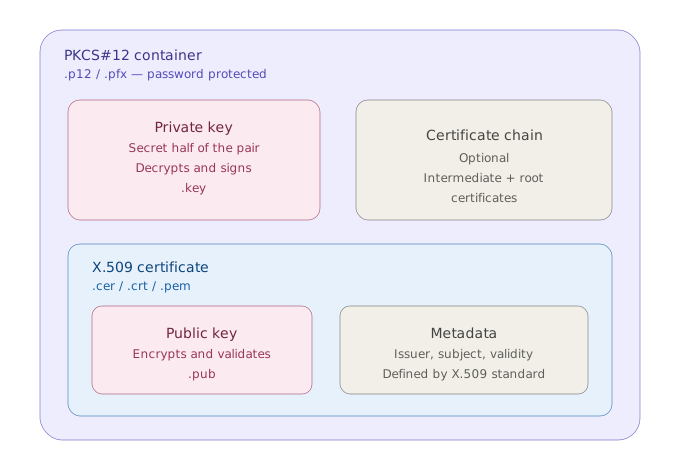
(Final note on this. Earlier, we mentioned that key pairs and key stores are the higher levels of what we can use. What is a key store? It is simply a way of having several cryptographic files together. A key store is not defined by any particular standard, although existing standards (like the PKCS#12 we just mentioned, or Java’s own JKS) can be used to bundle together several key pairs, thus acting like a key store. It is a bit confusing because the precise definition of key store depends on who implements it and how, so our working idea should be: a key store is where cryptographic objects live.)
Linking several certificates together
Now we have all the pieces to know what is what. A certificate is nothing more than some public key, metadata, and a bunch of abstraction holding it together. A private key + a certificate = a key pair. So far we can understand how these can be used to encrypt and decrypt information, or how to sign and verify data. But how do we use them to trust?
The place where one might find certificates in a context of “I need to trust this interaction” is SSL. SSL is what happens when you open a webpage and see a padlock next to the URL. It is a protocol developed in the 1990s that evolved into something called TLS (but even today it is commonly referred to as SSL/TLS). It is a way for computers over the internet to actually have a way of verifying each other’s identities and also encrypt information before it is sent over the wires that make the Internet. As you can imagine, this protocol uses things we already know, like certificates, which can be used to encrypt/decrypt information.
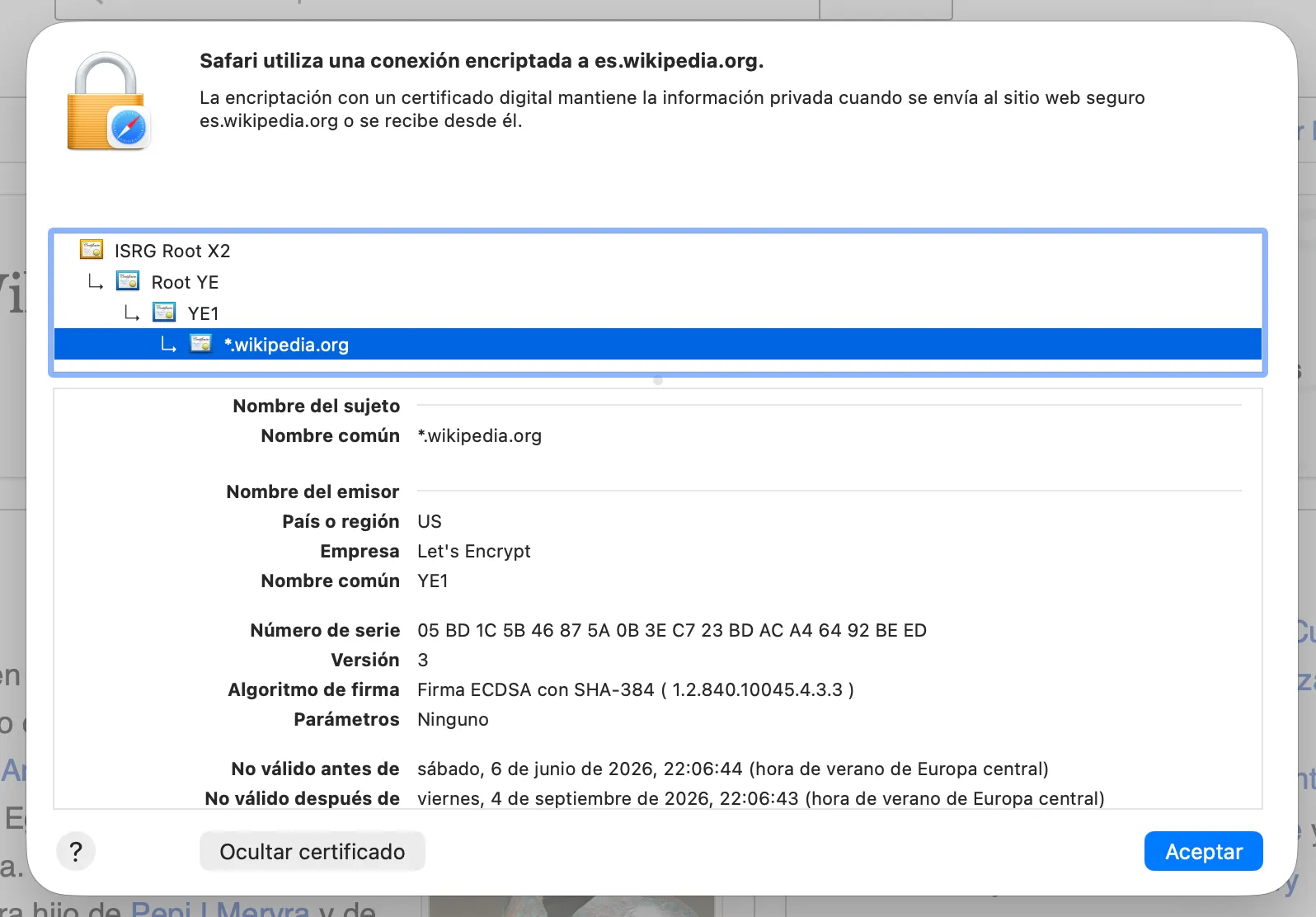
Let’s explore how this works in detail. As we mentioned, a certificate contains metadata, and one of those data points is the issuer. An issuer is simply an organization that produces a certificate. Nothing special about it. You can generate a certificate, like we did before, issued by the defunct state of Yugoslavia. It does not mean that the certificate is valid or truthful.
This was a genuine problem in the eighties: anyone could claim to be someone over a network, and there was no way of verifying the authenticity of the claim. The solution that we still know today was the following:
- You generate a set of private and public keys by some means. No metadata: only the mathematical elements given by a cryptosystem (RSA, elliptic curve cryptography, etc.)
- Along with the public key, another object is generated: a Certificate Signing Request, or CSR. These are files that say: I have this public key, and I claim to be this person or organisation, but I need someone else to verify it for me. As files, they usually come with extension
.csr,.req, or even.pem, because they are generated following the same rules as certificates. If you open them, they often look just like a PEM certificate: a header specifying the type of file, a footer and some base64 encoded data.
-----BEGIN CERTIFICATE REQUEST-----
MIICzDCCAbQCAQAwgYYxCzAJBgNVBAYTAkVOMQ0wCwYDVQQIDARub25lMQ0wCwYD
VQQHDARub25lMRIwEAYDVQQKDAlXaWtpcGVkaWExDTALBgNVBAsMBG5vbmUxGDAW
BgNVBAMMDyoud2lraXBlZGlhLm9yZzEcMBoGCSqGSIb3DQEJARYNbm9uZUBub25l
3wHFK+S7BRWrJQXcM8veAex(...)HQ+FgGfD0eSYGz0kyP26Qa2pLTwumjt+nBPl
rfJxaLHwTQ/1988G0H35ED0f9Md5fzoKi5evU1wG5WRxdEUPyt3QUXxdQ69i0C+7
-----END CERTIFICATE REQUEST------
This certificate signing request is sent to an agency specialising in these types of verifications. These are often called Certificate Authorities, or CA for short. They are organisations that do the work of verifying that the sender actually has the credentials to claim a certain identity. For example, in Spain you can get a personal identity certificate (named, rather confusingly, certificado electrónico ciudadano, even though it is not only a certificate) by appearing in a public office with your DNI; a public worker will apply advanced verification algorithms (they will look at your DNI and then at your face) and they will verify that you can claim your identity. Then, a CA (Fábrica Nacional de Moneda y Timbre) will sign it and issue a key pair with which you can claim to be you, or sign documents, or decrypt governmental info. In this instance, the public worker handles internally the generation of a certificate and the corresponding CSR, and the CA signs your certificate and bundles it with your private key.
-
What is the end result? The CA will give you a
.p12or.pfxfile, just like we mentioned in the previous section. If you open it, you will see that it contains:- Your personal certificate, issued by some entity you’ve never heard of before, probably.
- An intermediate certificate, claiming to be that entity. This intermediate certificate will, itself, claim to be issued by the original, well known CA.
- And lastly, a certificate issued by the CA to itself.
-
This means that you are issued a certificate chain: one certificate that says “do not trust me, trust this agency”, another certificate that says “do not trust me, trust the well-known CA”, and a third, upper-level certificate known as the root that says “hey, it’s me, the CA”. But this begs several questions: why are there three certificates, instead of just two? Or why should I trust any CA in particular?
- Because your certificate needs to be signed, this means that there is another certificate over it that needs to use its own private key. If there were only two levels, then the CA itself would need to use its private key to sign a huge number of certificates, and that key would have to be kept online and in constant use. If the CA private key is compromised, then all certificates issued by it are compromised. Keeping a small number of intermediate authorities lets the root key stay locked away and used rarely, which solves this problem.
- Indeed, sometimes you will see that there are two or more intermediate certificates (like the Wikipedia screenshot from before). It works the same: an certificate asks you to trust another certificate, which is itself signed by a well known CA.
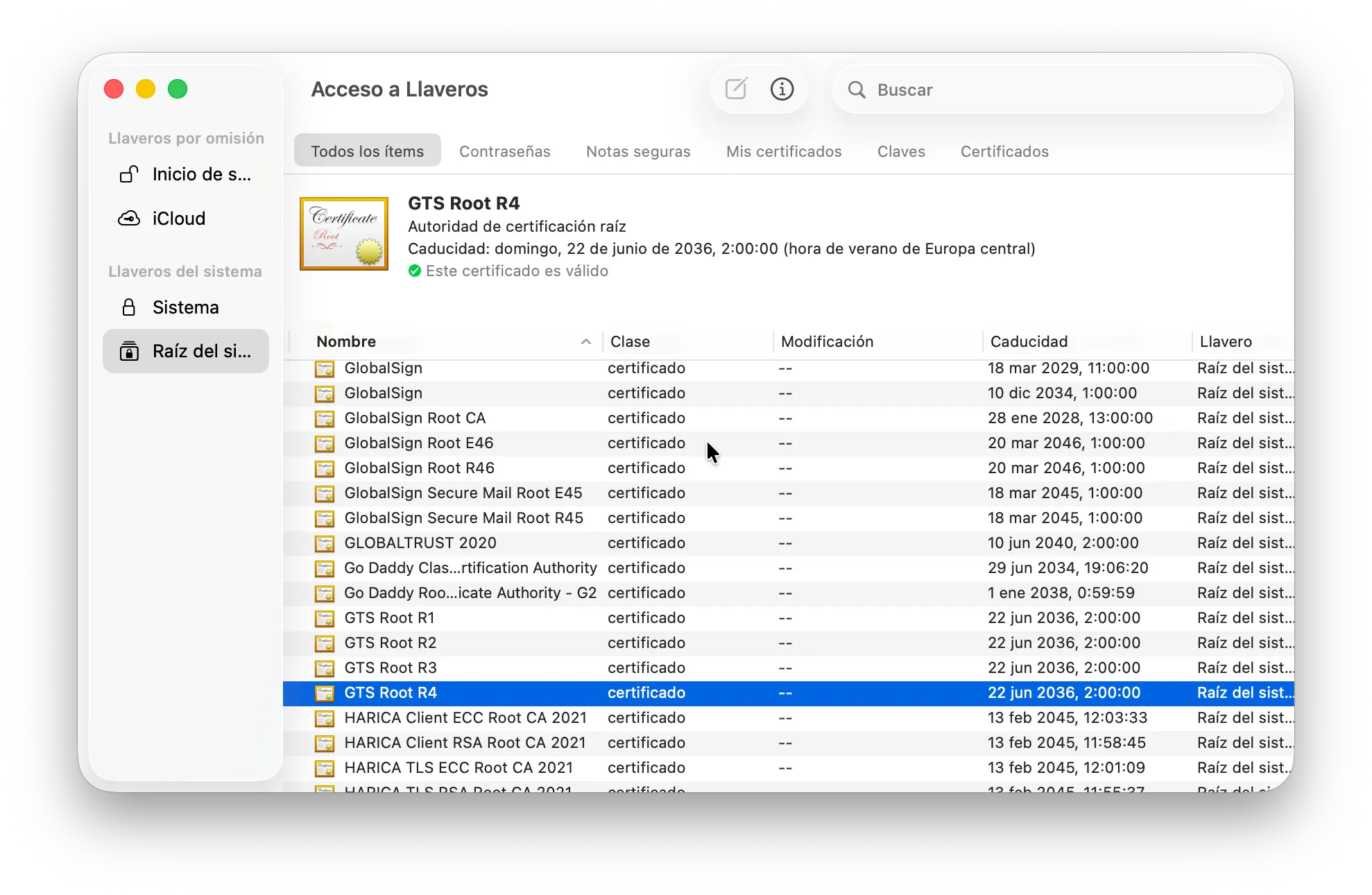
- CAs do not need to be trusted inherently. After all, they sign their own certificates. Instead, because there are not a lot of them, many vendors (Microsoft, Apple, Google, SAP, Salesforce, AWS…) already keep a copy of the main root certificates in-house. This way, if someone over the internet presents their own certificate alongside an intermediate certificate, chances are you will already have the missing root certificate installed in your own system. This is also the reason why sometimes you need to install a certificate chain or a new root in your system: the vendor might not have included it because of an oversight or just because they cannot cover them all natively.
You can sign your own certificates. These are called self-signed certificates, and they can be useful for unit tests, technical POCs, or even real encryption protocols like PGP that do not require to establish trust. But for productive work, a CA-signed certificate and the complete chain are often needed.
Resources
There are many sites and tools that can be used to learn and do tests with real certificates and key pairs. Here is a non-exhaustive list:
- KeyStore Explorer. An application that lets you explore in-depth any cryptographic object. It lets you check even things that are not usually reachable, like the ASN.1 expression of a certificate or even the prime numbers used to generate an RSA key. Very useful. Link.
- BadSSL.com. There are many reasons why you would not trust someone on the internet. Maybe their certificate is expired, or it is signed by a sketchy CA, or the key they use is so small it is not considered secure anymore, or they do not offer a complete trust chain. There are countless reasons, and this page allows you to connect to endpoints that offer you bad certificates to see for yourself how your system behaves. Link.
- If you do research about cryptography, you will read very often that something was defined “in RFC
X”,Xbeing a four-digit number. While RFC means “Request For Comments”, they are not actually looking for you to comment anything back. This is just the name of the documents published by the Internet Engineering Task Force (IETF), the organisation that orchestrates and solidifies the ways the Internet operates. When an RFC is published, it is already on its way to becoming a solid standard. You can search for individual RFCs here: link. They are usually arid and a bit dense, but are the original source for most of these ideas.