
Stop asking, start listening: a case for event-driven database integration
Published:
In many custom-built data replication and integration setups, a common pattern appears: a scheduled job queries a database every few minutes (or every hour, or every night), picks up whatever has changed since the last run, and feeds that data into another system. It works, it is simple to reason about, and for plenty of applications it is good enough.
The trouble starts when the data load grows, or when it becomes uneven. Imagine a burger stand that starts small and eventually becomes a chain. Orders that used to trickle in throughout the day now arrive in bursts: lunchtime, dinnertime, weekends. The polling job that worked fine at fifty orders a day now faces ten thousand, all piled up at the same hour — right when the database is already under its heaviest transactional load. Delays creep in. Occasionally things fall over. And if a run fails halfway through, you are left choosing between reprocessing the whole batch (risking duplicates in the target system) or skipping what already ran (leaving gaps). The root cause is not the volume itself, but the shape of it: polling turns a continuous stream of events into a batch, and batches, by definition, accumulate.
The alternative is an event-driven approach. Instead of a system that periodically asks “what changed?”, you build one where changes announce themselves the moment they are committed to the database, and downstream systems react at their own pace. Load spreads naturally across time. A failure no longer puts you in duplicate-or-gap territory, because each change is a discrete, ordered event that either gets processed or sits in the queue until it does. And if you need a new consumer, you subscribe to the stream; you do not have to change the source system at all.
For databases, the event-driven alternative to polling is to consume changes directly from the database’s own transaction log. This is called Change Data Capture (CDC). Instead of asking “what changed since I last looked?”, you subscribe to the answer as it is written; each INSERT, UPDATE, or DELETE becomes an event the moment it is committed. In this post I want to show what this looks like in practice, using a simple example: a table of burger stand ingredients, a Debezium connector reading MariaDB’s binary log, Kafka as the event backbone, and SAP Event Mesh as the final destination.
The goal of this post is to build an intuitive understanding of how a polling-based architecture can be transformed into an event-driven one. We will set up a system that enables near-real-time replication whenever the database is modified, rather than relying on periodic integration jobs. The resulting architecture is shown below, and will be explained shortly in detail.
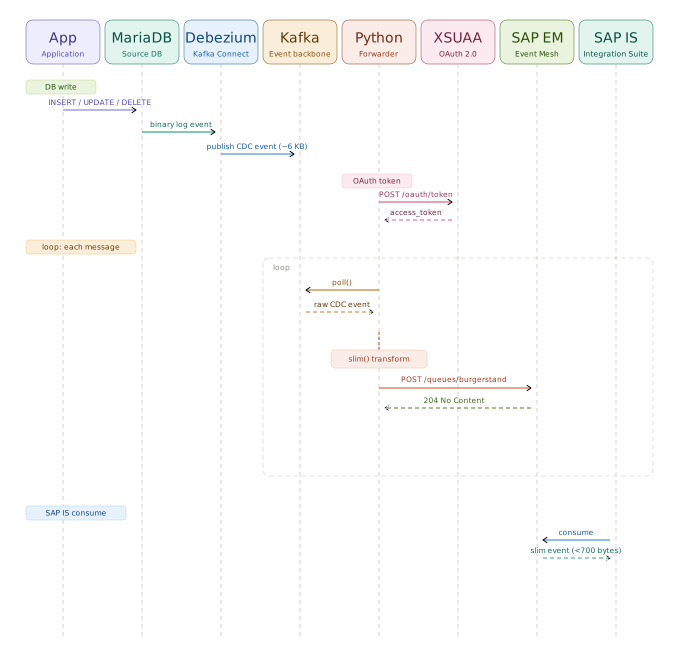
(The forwarder step has two viable options, which the last section of this post covers in detail. Everything else runs in Docker through compose files, so the setup is reproducible on any machine with Docker installed).
The stack
Two Docker Compose projects make up the whole thing.
The first one is MariaDB, using the LinuxServer image. There is nothing special here: a single container with a database, a user, and a password. The important bit is the volume mapping, since LinuxServer uses /config as its data root, not the usual /var/lib/mysql. This matters when you need to override configuration, as we will see shortly.
services:
  mariadb:
    image: lscr.io/linuxserver/mariadb:latest
    container_name: mariadb
    environment:
      - PUID=1000
      - PGID=1000
      - TZ=Europe/Madrid
      - MYSQL_ROOT_PASSWORD=yourRootPassword
      - MYSQL_DATABASE=puesto_hamburguesas
      - MYSQL_USER=datachef
      - MYSQL_PASSWORD=yourPassword
    volumes:
      - ./data:/config
      - ./conf.d:/etc/my.cnf.d
    ports:
      - 3306:3306
    restart: unless-stopped

networks:
  default:
    name: mariadb_default
One thing worth noting: the explicit network name mariadb_default. The second Compose project (Kafka) needs to reach MariaDB across Docker networks, and it references this network as external. If you let Docker name the network automatically it will include the project directory name, which makes it fragile. Naming it explicitly is the cleaner approach.
The second project is Kafka + Zookeeper + Kafka UI + Debezium. Debezium runs as a Kafka Connect worker (it is not a standalone process but a plugin loaded by the Connect framework, which exposes a REST API for managing connectors).
services:
  zookeeper:
    image: confluentinc/cp-zookeeper:7.6.0
    # ...

  kafka:
    image: confluentinc/cp-kafka:7.6.0
    environment:
      KAFKA_ADVERTISED_LISTENERS: INTERNAL://kafka:9093,EXTERNAL://localhost:9095
      KAFKA_HEAP_OPTS: "-Xmx512m -Xms512m"
    # ...

  kafka-ui:
    image: provectuslabs/kafka-ui:latest
    ports:
      - "8080:8080"
    # ...

  debezium:
    image: quay.io/debezium/connect:2.7
    ports:
      - "8087:8083"
    environment:
      BOOTSTRAP_SERVERS: kafka:9093
      CONNECT_PLUGIN_PATH: /kafka/connect,/kafka/connect/extra-connectors
    volumes:
      - ./connectors/http-connector-for-apache-kafka-0.9.0:/kafka/connect/extra-connectors
    # ...

networks:
  default:
    name: kafka_default
  mariadb_default:
    external: true
The KAFKA_HEAP_OPTS setting deserves a mention. The default value in the Confluent image is 128MB, which is not enough for Kafka’s log cleaner to initialise on startup, throwing an OutOfMemoryError before the broker is ready. 512MB is a reasonable floor for local development.
In the end, most of the setup runs on containers… which is always a good thing.

Preparing the database
CDC tools like Debezium do not poll the database. Instead, they read the database engine’s internal transaction log: the sequential, ordered record of every change committed to disk. In MariaDB this is called the binary log (binlog). PostgreSQL has the WAL (Write-Ahead Log), Oracle has redo logs, SQL Server has its own CDC mechanism. The names and configuration differ, but the principle is the same.
For Debezium to read it, the log must be enabled and configured to record the full before and after state of each changed row (rather than just the SQL statement that caused the change). The MariaDB documentation on the binary log covers all the relevant options. The database user Debezium connects with also needs replication-related privileges and the ability to lock tables for the initial snapshot.
The specific steps to enable and tune the log vary by deployment, so I will not go into detail here. What matters is understanding why it is needed: without access to the transaction log, there is nothing to stream.
The data
To have something to work with, we create a table called ingredientes with columns that make sense for a burger stand: supplier, unit price, allergen flags, inventory count, expiry date, and so on. A mix of types (VARCHAR, DECIMAL, TINYINT, DATE, TEXT, TIMESTAMP) is useful for testing that the serialisation handles everything correctly.
CREATE TABLE ingredientes (
    id                    INT AUTO_INCREMENT PRIMARY KEY,
    nombre_ingrediente    VARCHAR(100)   NOT NULL,
    categoria             VARCHAR(50)    NOT NULL,
    proveedor             VARCHAR(100)   NOT NULL,
    precio_unitario       DECIMAL(7,2)   NOT NULL,
    unidad                VARCHAR(20)    NOT NULL,
    es_vegano             TINYINT(1)     NOT NULL DEFAULT 0,
    contiene_gluten       TINYINT(1)     NOT NULL DEFAULT 0,
    contiene_soja         TINYINT(1)     NOT NULL DEFAULT 0,
    contiene_lactosa      TINYINT(1)     NOT NULL DEFAULT 0,
    contiene_frutos_secos TINYINT(1)     NOT NULL DEFAULT 0,
    cantidad_inventariada DECIMAL(10,2)  NOT NULL,
    stock_minimo          DECIMAL(10,2)  NOT NULL,
    fecha_caducidad       DATE,
    origen_pais           VARCHAR(50),
    ecologico             TINYINT(1)     NOT NULL DEFAULT 0,
    notas                 TEXT,
    fecha_alta            TIMESTAMP      NOT NULL DEFAULT CURRENT_TIMESTAMP
);
The database can be edited by sending queries through the terminal, but I wanted to avoid having my lousy SQL skills be an annoyance. For this reason, I will be using a graphical app to edit and check the state of the database, Sequel Ace.

Registering the Debezium source connector
Connectors in Kafka Connect are registered via a POST to the Connect REST API. Debezium’s MariaDB connector (io.debezium.connector.mariadb.MariaDbConnector) is included in the official image (note this is different from the MySQL connector; use the MariaDB-specific one to avoid quirks):
curl -X POST http://localhost:8087/connectors \
  -H "Content-Type: application/json" \
  -d '{
    "name": "mariadb-cdc-source",
    "config": {
      "connector.class": "io.debezium.connector.mariadb.MariaDbConnector",
      "database.hostname": "mariadb",
      "database.port": "3306",
      "database.user": "datachef",
      "database.password": "yourPassword",
      "database.server.id": "1",
      "database.ssl.mode": "disabled",
      "topic.prefix": "puesto_hamburguesas",
      "database.include.list": "puesto_hamburguesas",
      "table.include.list": "puesto_hamburguesas.ingredientes",
      "schema.history.internal.kafka.bootstrap.servers": "kafka:9093",
      "schema.history.internal.kafka.topic": "schema-changes.puesto_hamburguesas"
    }
  }'
When the connector starts, it does an initial snapshot: it reads all existing rows from the table and publishes them to the Kafka topic puesto_hamburguesas.puesto_hamburguesas.ingredientes as READ events. After that it switches to streaming mode, tailing the binlog in real time.
Each event is a JSON envelope with a schema section (describing the structure) and a payload section (containing the actual data). The payload includes an op field (r for snapshot reads, c for inserts, u for updates, d for deletes) and before/after objects with the row state.
Forwarding events to SAP Event Mesh
SAP Event Mesh exposes a REST API for publishing to queues. Authentication uses OAuth 2.0 client credentials: post to the UAA token endpoint with your client ID and secret, then include the resulting Bearer token on every message delivery request. All connection details are in the service key that BTP generates when you bind the service. Queues are not auto-created on first publish, so create the queue in the Event Mesh dashboard before running anything.
There are two ways to bridge the gap between Kafka and Event Mesh.
Kafka Connect HTTP Sink
Kafka Connect supports sink connectors that read from a topic and post to an HTTP endpoint. The Aiven HTTP Connector is, as far as I’ve come to understand this, the standard choice for this. (Do not quote me on this, as this is still new to me and there might be better solutions out there that I simply do not know). You drop the JAR into the Debezium container’s plugin path, register the connector through the REST API, and it handles OAuth2, retries, and offset management automatically. Full configuration details arein the Aiven documentation.
The caveat is message size. Debezium includes a complete schema section in every event, describing every field, its type, and its constraints. This envelope can push a single event past 5KB on a table with a modest number of columns. That schema metadata is repeated on every single message. For SAP Integration Suite, which expects concise business messages, this creates noise that has to be stripped somewhere downstream.
Python forwarder with a slim transform
The alternative is a small consumer script that reads from Kafka, transforms each message, and posts to Event Mesh directly. The transformation is the key part: instead of forwarding the full Debezium envelope, it extracts only what a downstream integration flow actually needs.
def slim(raw_bytes: bytes) -> bytes:
    msg = json.loads(raw_bytes)
    p = msg.get("payload", msg)
    return json.dumps({
        "op":     p.get("op"),
        "table":  (p.get("source") or {}).get("table"),
        "ts_ms":  p.get("ts_ms"),
        "before": p.get("before"),
        "after":  p.get("after"),
    }, ensure_ascii=False).encode()
This brings a typical event from around 6KB down to under 700 bytes.
What you get
Once everything is running, any change to the ingredientes table produces an event within milliseconds. The events are discoverable both on the backend (through Kafka’s browser UI which we installed) and on SAP Integration Suite. As an example, in the following screenshot a few changes to the database (left side) are viewed in live mode in Kafka’s UI (right side):

Using the our Python forwarder, an insert arrives at the actual queue in SAP Event Mesh in milliseconds, looking like this:
{
  "op": "u",
  "table": "ingredientes",
  "ts_ms": 1775030303013,
  "before": {
    "id": 21,
    "nombre_ingrediente": "Salsa sriracha",
    "categoria": "Salsa",
    "proveedor": "ImportFood Asia",
    "precio_unitario": "CQ==",
    "unidad": "15ml",
    "es_vegano": 1,
    "contiene_gluten": 0,
    "contiene_soja": 0,
    "contiene_lactosa": 0,
    "contiene_frutos_secos": 0,
    "cantidad_inventariada": "CWA=",
    "stock_minimo": "Opg=",
    "fecha_caducidad": 20878,
    "origen_pais": "Tailandia",
    "ecologico": 0,
    "notas": null,
    "fecha_alta": "2026-03-31T15:42:38Z"
  },
  "after": {
    "id": 21,
    "nombre_ingrediente": "Salsa sriracha",
    "categoria": "Salsa",
    "proveedor": "ImportFood Asia",
    "precio_unitario": "CQ==",
    "unidad": "15ml",
    "es_vegano": 1,
    "contiene_gluten": 0,
    "contiene_soja": 0,
    "contiene_lactosa": 0,
    "contiene_frutos_secos": 0,
    "cantidad_inventariada": "CcQ=",
    "stock_minimo": "Opg=",
    "fecha_caducidad": 20878,
    "origen_pais": "Tailandia",
    "ecologico": 0,
    "notas": null,
    "fecha_alta": "2026-03-31T15:42:38Z"
  }
}
An update includes both the before and after states, which means downstream consumers can react not just to what the new value is, but to what it changed from. A price increase, a stock level dropping below the minimum, an expiry date being corrected: all of these become distinct, timestamped, ordered events. No polling, no batch windows, no guessing what changed between runs.
The whole process is remarkably quick. The event appears in SAP Event Mesh almost instantly:

And equally as fast, the consumer of these events (an integration flow, a microservice, a data pipeline) processes each change as it happens, with a load that is naturally spread across time rather than concentrated into whatever interval the polling job runs at.

What this enables in SAP Integration Suite
Once a change from your database is sitting in a queue, SAP Integration Suite can take over, and this is where the architecture starts to pay off properly. Instead of having all changes in a day be read at once (with the consequent overload, possibility of HTTP 429 Errors, write-blocked objects in your target platform, etc.), changes are transmitted almost live. There are fewer activity peaks, almost no delay, and no risk of performing an incorrect read due to a faulty delta-oriented query.
The most straightforward next step is to wire a JMS queue to the Event Mesh queue. JMS (Java Message Service) provides durable, ordered message delivery with acknowledgements, meaning that if an integration flow fails while processing an event, the message stays in the queue and will be retried rather than lost. Combined with SAP Integration Suite’s iFlow capabilities, you can build a replication pipeline that is genuinely robust: each event is processed exactly once, in order, with full visibility into what succeeded and what did not.
This is a meaningful upgrade over anything polling-based can offer. A polling job that fails halfway through a batch either reprocesses the whole batch (risking duplicates) or skips what it already processed (risking gaps). An event-driven pipeline with JMS queuing has clear transactional boundaries: each message is either acknowledged or it is not, and the broker keeps it until it is.
Beyond replication, the same event stream can feed multiple consumers simultaneously: an iFlow that updates a downstream ERP system, another that triggers a notification, another that writes to a data warehouse. Each consumer moves at its own pace without affecting the others or the source database. Adding a new consumer means subscribing to the queue; it does not mean touching the source system at all.
The setup described in this post is intentionally simple: one table, one queue. In practice you might want to route different tables to different queues, or enrich events with metadata before they leave Kafka. Or, perhaps, slim down the payload a bit (which is what I did here).
What I find useful about demonstrating this at the “burger stand” scale is that the pattern is the same regardless of volume. The same configuration that handles thirty ingredient records will handle three million order lines, and it will handle them with the same latency and the same even distribution of load. The full stack runs in Docker with two compose.yaml files and a handful of curl commands. If you want to replicate it, all the pieces (MariaDB, Zookeeper, Kafka, Kafka UI, Debezium, and the Aiven HTTP connector) are freely available.